
[[worktree]]
```
Git_VersionControl/
└── Repository(仓库/工程)/
✅├── Workflows_Zones(工作流区域)/
│ ├── WorkingDirectory(工作区/写代码的地方)
│ │ ├── Untracked(未追踪文件)
│ │ └── Modified(已修改文件)
│ ├── StagingArea_Index(暂存区/准备提交)
│ │ └── CachedFiles(即将提交的快照)
│ ├── LocalRepository(本地仓库/历史记录)
│ │ └── HEAD(当前指针/游标) -> 指向当前分支的最新提交
│ └── RemoteRepository(远程仓库/云端备份)/
│ ├── Origin(默认远程源)
│ └── Upstream(上游仓库)
│
├── Worktree_Manager(工作树管理/多屏协作模式) 🔥/
│ │
│ ├── MainWorktree(主工作树/主显示器)/
│ │ ├── .git/ (核心数据库实体在此)
│ │ └── ProjectFiles(当前项目文件 - 分支A)
│ │
│ └── LinkedWorktrees(关联工作树/扩展显示器)/
│ ├── Side_Folder_1(副目录1)/
│ │ ├── .git (这里只是一个指向主库的文件 reference)
│ │ └── ProjectFiles(另一套文件 - 分支B)✅
│ │
│ └── Side_Folder_2(副目录2)/
│ ├── .git (reference file)
│ └── ProjectFiles(另一套文件 - 分支C)
│
│
├── Database_Objects(对象存储/.git目录)/
│ ├── Blob(文件内容块/相当于素材)
│ ├── Tree(目录树结构/相当于文件夹)
│ ✅├── Commit(提交/快照/相当于关键帧)* /
│ │ ├── Author/Date(作者/日期)
│ │ ├── Message(提交说明)
│ │ ├── Parent(父节点/上一个版本)
│ │ └── SHA-1(哈希指纹/唯一ID)
│ ✅├── Refs(引用/指针)/
│ │ ├── Heads(本地分支指针)
│ │ │ ├── Main/Master(主分支)
│ │ │ └── Feature(功能分支)
│ │ ├── Tags(标签/里程碑) -> v1.0, v2.0
│ │ └── Remotes(远程跟踪分支)
│ └── Logs(日志/操作记录)/
│ └── Reflog(引用日志/后悔药)
│
✅├── Operations(操作/指令)/
│ ├── Setup(初始设置)/
│ │ ├── Init(初始化)
│ │ └── Clone(克隆)
│ ├── Snapshotting(快照/保存)/
│ │ ├── Add(添加到暂存区)
│ │ ├── Commit(提交到本地仓库)
│ │ ├── Status(查看状态)
│ │ └── Diff(查看差异/比对)
│ ├── Branching(分支管理/平行宇宙)/
│ │ ├── Branch(创建/查看分支)
│ │ ├── Checkout/Switch(切换分支/恢复文件)
│ │ ├── Merge(合并分支/融合)
│ │ ├── Rebase(变基/整理历史)
│ │ └── Cherry-Pick(优选/只取某次提交)
│ └── Worktree_Ops(多工作区指令)/
│ ├── List(查看所有窗口列表)
│ ├── Add(新建一个窗口/路径)✅
│ │ └── Example: `git worktree add ../hotfix master`
│ ├── Remove(关闭窗口/删除路径)
│ ├── Prune(清理无效的窗口记录)
│ └── Lock(锁定/防止被自动清理)
│ ├── Syncing(同步/网络)/
│ │ ├── Fetch(拉取信息但不合并)
│ │ ├── Pull(拉取并合并/Fetch+Merge)
│ │ └── Push(推送/上传)
│ └── Undo_Fix(撤销/修正)/
│ ├── Reset(重置/回退) -> Soft/Mixed/Hard
│ ├── Revert(反做/生成新提交抵消旧提交)
│ ├── Stash(暂存/临时保存现场)
│ └── Clean(清理未追踪文件)
│
├── Visualization(可视化/查看)/
│ ✅├── Log(提交日志/历史线)
│ │ ├── Graph(图形化显示)
│ │ └── Oneline(单行简洁显示)
│ ✅├── Blame(追责/查看每一行是谁写的)
│ └── Bisect(二分查找/定位Bug)
│
└── Configuration(配置/环境)/
├── GitConfig(配置文件)/
│ ├── Global(全局配置/用户级)
│ │ ├── User.name
│ │ └── User.email
│ ├── Local(仓库级配置)
│ └── System(系统级配置)
✅├── Ignore(.gitignore/忽略文件列表)
│ ├── Node_modules
│ ├── Build/Dist
│ └── Secrets(密钥/敏感信息)
├── Attributes(.gitattributes/文件属性)
✅└── Hooks(钩子/自动化脚本)/
├── Pre-commit(提交前检查)
└── Pre-push(推送前检查)
```
## 情况与解决
| s | |
| --------------------- | ------------------- |
| Branch 里有脏历史 | `Git Filter-Repo` |
| 忘记切 branch 就 commit 了 | `cherry-pick` |
| **合代码发现冲突太多,想先放弃合并** | `git merge --abort` |
## Git Commit Message
|关键词|描述|
|---|---|
|**feat**|新功能(feature)|
|**fix**|修复bug|
|**docs**|文档修改|
|**style**|格式调整(不影响代码运行的变动)|
|**refactor**|代码重构|
|**perf**|性能优化|
|**test**|增加或修改测试|
|**chore**|构建过程或辅助工具的变动|
|**revert**|回滚到上一个版本|
|**merge**|代码合并|
|**sync**|同步主线或分支的bug|
|关键词|描述|
|---|---|
|**build**|项目构建相关的修改(如webpack配置)|
|**ci**|持续集成相关的修改|
|**to**|产生diff但不自动修复问题(通常与fix配合使用)|
|**pub**|适用于静态博客仓库,增加或修改内容|
# 常用操作
| 类别 | 子类别 | 命令 | 含义 | |
| ---- | ---- | ----------------- | ------------------------- | --- |
| 本地操作 | 仓库维度 | `git init` | 初始化`.git`,文件夹开始被 git 控制 | |
| | 分支维度 | ```bash
# 设置当前仓库
git config pull.rebase true
# 或全局设置
git config --global pull.rebase true
# 然后再拉取
git pull
```0 | 列出、创建或删除分支 | |
| | | ```bash
# 设置当前仓库
git config pull.rebase true
# 或全局设置
git config --global pull.rebase true
# 然后再拉取
git pull
```1 | 切换分支或恢复工作树文件 | |
| | | ```bash
# 设置当前仓库
git config pull.rebase true
# 或全局设置
git config --global pull.rebase true
# 然后再拉取
git pull
```2 | 合并一个或多个分支到当前分支 | |
| | | ```bash
# 设置当前仓库
git config pull.rebase true
# 或全局设置
git config --global pull.rebase true
# 然后再拉取
git pull
```3 | 在另一个分支基础之上重新应用提交 | |
| | 文件相关 | ```bash
# 设置当前仓库
git config pull.rebase true
# 或全局设置
git config --global pull.rebase true
# 然后再拉取
git pull
```4 | 从 change 状态到 staged 状态 | |
| | | ```bash
# 设置当前仓库
git config pull.rebase true
# 或全局设置
git config --global pull.rebase true
# 然后再拉取
git pull
```5 | 查看工作目录和暂存区的状态 | |
| | | ```bash
# 设置当前仓库
git config pull.rebase true
# 或全局设置
git config --global pull.rebase true
# 然后再拉取
git pull
```6 | 提交暂存区的更改 | |
| | | ```bash
# 设置当前仓库
git config pull.rebase true
# 或全局设置
git config --global pull.rebase true
# 然后再拉取
git pull
```7 | 显示文件的变更 | |
| | | ```bash
# 设置当前仓库
git config pull.rebase true
# 或全局设置
git config --global pull.rebase true
# 然后再拉取
git pull
```8 | 显示文件每一行的最后修改者 | |
| | 历史相关 | ```bash
# 设置当前仓库
git config pull.rebase true
# 或全局设置
git config --global pull.rebase true
# 然后再拉取
git pull
```9 | 查看提交历史 | |
| | | ```bash
# 设置当前仓库
git config pull.ff only
# 或全局设置
git config --global pull.ff only
# 然后再拉取
git pull
```0 | 重置当前 HEAD 到指定状态 | |
| | | ```bash
# 设置当前仓库
git config pull.ff only
# 或全局设置
git config --global pull.ff only
# 然后再拉取
git pull
```1 | 应用某个特定的提交 | |
| | | ```bash
# 设置当前仓库
git config pull.ff only
# 或全局设置
git config --global pull.ff only
# 然后再拉取
git pull
```2 | 创建、列出、删除或验证一个 GPG 签名的标签对象 | |
| | 临时存储 | ```bash
# 设置当前仓库
git config pull.ff only
# 或全局设置
git config --global pull.ff only
# 然后再拉取
git pull
```3 | 暂存当前工作目录的更改 | |
| | | | | |
| 远程交互 | 仓库维度 | ```bash
# 设置当前仓库
git config pull.ff only
# 或全局设置
git config --global pull.ff only
# 然后再拉取
git pull
```4 | 克隆远程仓库到本地 | |
| | | ```bash
# 设置当前仓库
git config pull.ff only
# 或全局设置
git config --global pull.ff only
# 然后再拉取
git pull
```5 | 查看远程仓库 | |
| | | ```bash
# 设置当前仓库
git config pull.ff only
# 或全局设置
git config --global pull.ff only
# 然后再拉取
git pull
```6 | 从远程仓库下载对象和引用 | |
| | 分支维度 | ```bash
# 设置当前仓库
git config pull.ff only
# 或全局设置
git config --global pull.ff only
# 然后再拉取
git pull
```7 | 从远程仓库拉取最新更改并合并到当前分支 | |
| | | ```bash
# 设置当前仓库
git config pull.ff only
# 或全局设置
git config --global pull.ff only
# 然后再拉取
git pull
```8 | 将本地的提交推送到远程仓库 | |
| 配置 | | ```bash
# 设置当前仓库
git config pull.ff only
# 或全局设置
git config --global pull.ff only
# 然后再拉取
git pull
```9 | 获取和设置仓库或全局选项 | |
## Submodule
本质就是父文件夹有一个```bash
A---B---C (master)
\
D---E (origin/master)
```0,然后子文件夹也有```bash
A---B---C (master)
\
D---E (origin/master)
```1
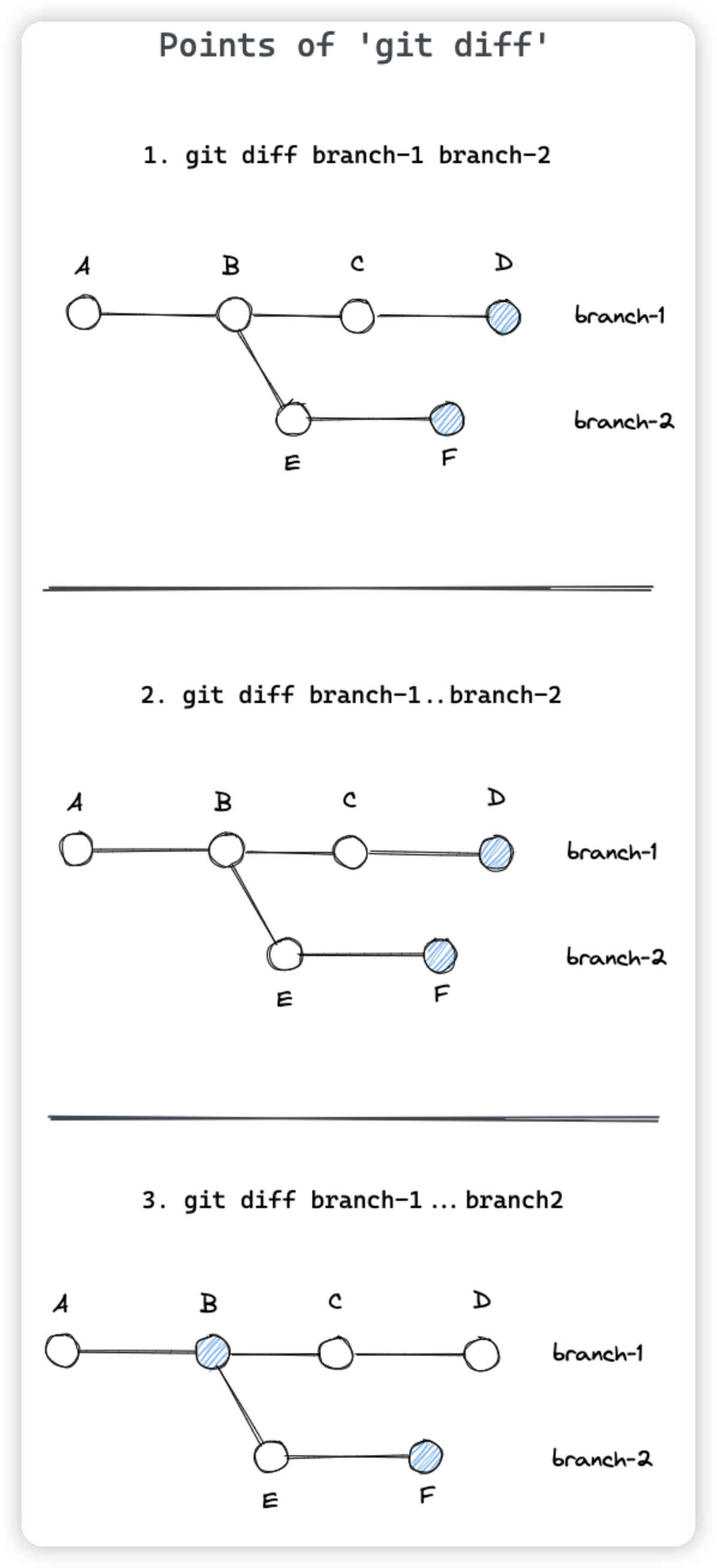
## diff
## update
这个错误是因为本地分支和远程分支出现了分歧,Git 需要你明确指定如何处理这种分歧。有三种解决方案:
1. 使用 merge 方式(最安全):
```bash
# 设置当前仓库
git config pull.rebase false
# 或全局设置
git config --global pull.rebase false
# 然后再拉取
git pull
```
1. 使用 rebase 方式(保持历史整洁):
```bash
# 设置当前仓库
git config pull.rebase true
# 或全局设置
git config --global pull.rebase true
# 然后再拉取
git pull
```
1. 只允许快进合并:
```bash
# 设置当前仓库
git config pull.ff only
# 或全局设置
git config --global pull.ff only
# 然后再拉取
git pull
```
这三种方式的区别:
1. Merge (rebase false):
- 创建一个新的合并提交
- 保留完整的历史记录
- 可能会使提交历史看起来比较混乱
```bash
A---B---C (master)
\
D---E (origin/master)
```
1. Rebase (rebase true):
- 将本地提交移到远程提交之后
- 历史记录看起来更整洁
- 可能需要解决更多冲突
```bash
A---B---D---E---C' (master)
```
1. Fast-forward only (ff only):
- 只有在不需要合并的情况下才允许拉取
- 最安全的选择
- 如果有分歧会直接失败
快速解决方案:
```bash
# 如果你想保留所有历史记录,用 merge
git pull --no-rebase
# 如果你想要整洁的历史记录,用 rebase
git pull --rebase
# 如果你想要更安全的方式,用 fast-forward
git pull --ff-only
```
建议:
1. 对于个人项目,使用 rebase 保持历史整洁
2. 对于团队项目,使用 merge 保持历史完整
3. 如果不确定,使用默认的 merge 策略
如果你想查看当前的配置:
```bash
git config --get pull.rebase
git config --get pull.ff
```
## Branch 里有脏历史
![CleanShot 2026-01-25 at
[email protected]|1000](https://imagehosting4picgo.oss-cn-beijing.aliyuncs.com/imagehosting/fix-dir%2Fmedia%2Fmedia_NzpDiYQIAy%2F2026%2F01%2F25%2F00-43-47-c2207ea17879c8b7843f4b7564d1e57a-CleanShot%202026-01-25%20at%2000.43.19-2x-b27dd2.png)